
IMPORTANT: The vagrant documentation is not up to date. We have moved everything to a docker-compose setup
- Make sure you have docker on your machine
- Clone this project
cdinto the cloned project- Write
docker-compose up -dto run the entire system. this starts up a rabbitmq instance, two http-api applications, one to acceptstudent_tester.pyrequests (helge-api) and one for the frontend to use (backend), a frontend project and a consumer for the rabbitmq
- Clone project
git clone https://github.com/ProjectHackernewsGroup04/Ops
- Go to /vm directory
cd vm
- Start up vagrant
vagrant up
- SSH into this machine
vagrant ssh
- Have FUN!
- Inside Vagrant vm
vagrant@vagrant:$ cd /app/
vagrant@vagrant:/app$ docker-compose up --build
The docker-compose.yaml file collects all dockerfile from other reposetories and runs them; sets ports and containers:
1 for backend (backend-app), 1 for frontend (frontend-app), 1 for mongodb (db).
vagrant@vagrant:/app$ sh database/testdata/import.sh
- Open new terminal and
vagrant ssh - Test backend
curl http://0.0.0.0:5000 - Test backend and mongodb ex:
curl http://0.0.0.0:5000/api/item/all - Test frontend
curl http://0.0.0.0:3000
Go to http://localhost:9000/ to watch frontend in action
Enjoy the HackerNews!
For CI/CD we're using CircleCI.
CircleCI allows us to version control the deployment process, as it uses simple yaml files to configure the workflow.
There's a deployment process for the database, backend and frontend. The backend and frontend builds, tests and deploys the software, while the database project configures a MongoDB instance with Docker and runs it.
All of the services are started using a command like: docker service create --name http-api --publish=5001:5001 --network=hnclone-network -e 'CLOUDAMQP_URL=<CLOUDAMQP_URL>' -e 'BACKEND_URL=http://backend:5000' -d hnclonecphb/http-api:master
After that, every time an update to the master is pushed, it will run a docker service update --image <IMAGE_NAME>:$CIRCLE_WORKFLOW_ID
The CI/CD workflow works like the following:
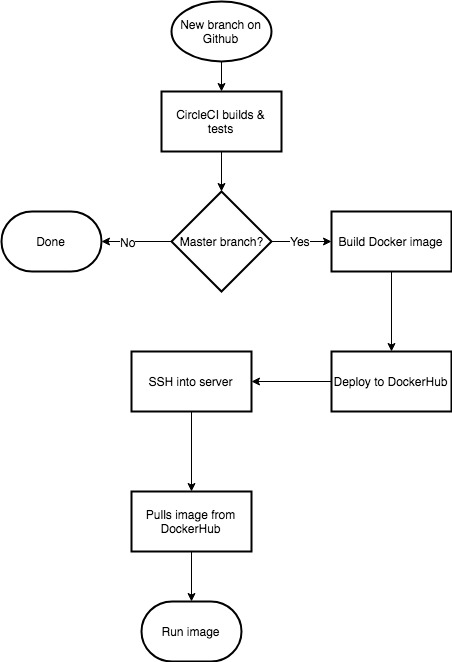


There is a guest user on the server that has access only to docker commands.
The server can be accesses through SSH at the IP address: 46.101.43.21. User and private key can be handed over upon request.
This section is docker specific operation guidelines.
docker service scale <SERVICE>=<NUMBER>docker service update <SERVICE>
On the server there are multiple docker containers running:
backendfrontendhttp-apirabbitmqrabbitmq-consumerdatabase
The names are pretty selfexplanatory if you've read the above documentation.
It's important all containers are up and running at all times. If one of them is down or something is wrong, you can check the logs by running docker service logs -f <container-name>. This will output and follow the logs from that container.
docker start <container-name>docker logs -f <container-name>
On the server there are multiple docker containers running:
backendfrontendhttp-apirabbitmqrabbitmq-consumerdatabase
The names are pretty selfexplanatory if you've read the above documentation.
It's important all containers are up and running at all times. If one of them is down or something is wrong, you can check the logs by running docker logs -f <container-name>. This will output and follow the logs from that container.
If a docker container is not running, you can start it with docker start <container-name>