





dirplot creates static nested treemap images for directory trees. It can display them in the system image viewer (default, works everywhere) or inline inside the terminal using the iTerm2 inline image protocol or the Kitty graphics protocol — detected automatically at runtime.
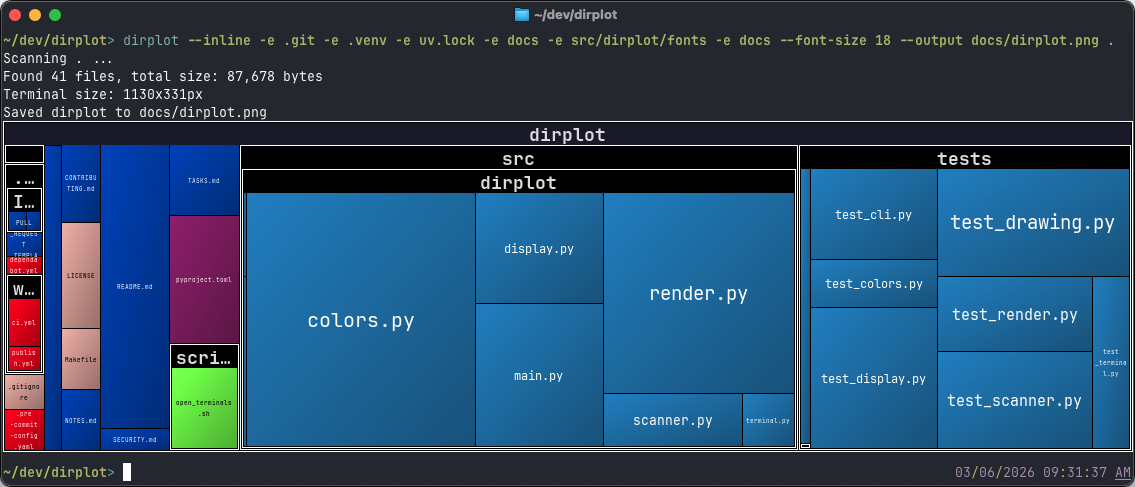
- Directories are shown as labelled, nested containers, mirroring the actual hierarchy.
- Squarified treemap layout — rectangles are as square as possible for easy reading.
- File area proportional to file size; colour determined by file extension.
- ~500 known extensions mapped to colours from the GitHub Linguist table; unknown extensions get an MD5-stable colour from any Matplotlib colormap.
- Label colour (black/white) chosen automatically based on background luminance.
- Output resolution matches the current terminal window pixel size (via
TIOCGWINSZ), or a customWIDTHxHEIGHT. - Van Wijk cushion shading gives tiles a raised 3-D appearance (optional).
- SVG output (
--format svgor--output file.svg) produces a fully self-contained interactive file: CSS hover highlight, a JavaScript floating tooltip panel, and cushion shading via a gradient — no external dependencies. - Display via system image viewer or inline in the terminal (iTerm2 and Kitty protocols, auto-detected).
- Save output to a PNG or SVG file with
--output, or pipe bytes to stdout with--output -(header lines go to stderr automatically). - Exclude paths with
--exclude(repeatable), or focus on specific subtrees with--subtree/-s(allowlist complement, supports nested paths likesrc/dirplot/fonts). - Pass multiple local paths (
dirplot map src tests) to scan each independently and display them under their common parent, ignoring all other siblings. Individual files are also accepted as roots (dirplot map main.py util.py). - Pipe
treeorfindoutput directly:tree src/ | dirplot mapandfind . -name "*.py" | dirplot mapare both supported. The format is auto-detected (tree -s,tree -f, and plainfindoutput all work). Use--paths-from FILEto read from a file instead of stdin. - Live watch mode (
dirplot watch) — monitors one or more directories and regenerates the treemap automatically. Rapid bursts of events (e.g.git checkout) are debounced into a single render after a configurable quiet period (--debounce, default 0.5 s). With--animate, each render is captured as a frame and the complete APNG or MP4 is written on Ctrl-C exit; changed tiles receive colour-coded highlight borders. All events can be logged to a JSONL file with--event-log. - Event log replay (
dirplot replay) — replays a JSONL filesystem event log (produced bydirplot watch --event-log) as an animated treemap APNG or MP4. Events are grouped into time buckets (one frame per bucket, default 60 s); only files referenced in the log appear in the treemap. Frame durations can be uniform or proportional to real elapsed time between buckets (--total-duration). Frames are rendered in parallel. - Git history replay (
dirplot git) — renders a git repository's commit history as an animated treemap APNG or MP4. Each commit becomes one frame, with colour-coded change highlights. Frame durations can be uniform (--frame-duration) or proportional to real elapsed time between commits (--total-duration). Frames are rendered in parallel across CPU cores for speed. Accepts a local path (with optional@refsuffix), or a GitHub URL. - MP4 output (
--output file.mp4) — all three animation commands (watch --animate,git --animate,replay) write MP4 video when the output path ends in.mp4or.mov. Quality is controlled via--crf(Constant Rate Factor: 0 = lossless, 51 = worst, default 23) and--codec(libx264H.264 orlibx265H.265). MP4 files are typically 10–100× smaller than equivalent APNGs. Requiresffmpegon PATH. - Works on macOS, Linux, and Windows; WSL2 fully supported.
- Scan remote hosts over SSH (
pip install "dirplot[ssh]"), AWS S3 buckets (pip install "dirplot[s3]"), any public/private GitHub repository (including specific branch, tag, commit SHA, or subdirectory), running Docker containers, or Kubernetes pods — all without extra dependencies beyond the respective CLI/SDK. See EXAMPLES.md. - Optional file-count legend (
--legend) — a corner overlay listing the top extensions by number of files, with coloured swatches and counts, automatically sized to fit the image. - Breadcrumbs mode (on by default) — single-child directory chains are collapsed into one tile with a
foo / bar / bazheader label. Middle segments are replaced with…when the tile is too narrow. Disable with-B/--no-breadcrumbs. - Tree depth shown in the root tile header alongside the file count and total size (e.g.
myproject — 124 files, 18 dirs, 4.0 MB (…), depth: 6). - Wide archive support — reads zip, tar (gz/bz2/xz/zst), 7z, rar, and all ZIP-based formats (jar, whl, apk, nupkg, vsix, ipa, …) as virtual directory trees without unpacking. Encrypted archives are handled gracefully: metadata-only reads work without a password for most formats; a password can be supplied with
--passwordor entered interactively when needed. Additional formats (iso, cpio, rpm, cab, lha/lzh, xar/pkg, a/ar, tar.zst) require the optionallibarchiveextra:pip install 'dirplot[libarchive]'.
- Scans the directory tree, collecting each file's path, extension, and size in bytes.
- Computes a squarified dirplot layout recursively — directories allocate space for their children.
- Renders to a PNG via Pillow (PIL) at the exact pixel dimensions of the current terminal window (detected via
TIOCGWINSZ), or at a custom size when--sizeis given. - Displays via the system image viewer (
open/xdg-open) or inline via an auto-detected terminal graphics protocol (iTerm2 or Kitty).
Extension colours come from the GitHub Linguist language colour table (~500 known extensions). Unknown extensions fall back to an MD5-stable colour derived from the chosen --colormap. File label text is automatically black or white depending on the background luminance.
Note: The recommended install methods below use uv. See the uv installation guide if you don't have it yet. Alternatively, use
pip install dirplotto install without uv.
# As a standalone tool (recommended)
uv tool install dirplot

# Into the current environment
pip install dirplot# As a standalone tool
uv tool install git+https://github.com/deeplook/dirplot
# Into the current environment
pip install git+https://github.com/deeplook/dirplotThis tool has been developed and tested on macOS and is CI-tested on Linux and Windows (Python 3.10+). The default --show mode works on all platforms. The --inline mode requires a terminal emulator that supports the iTerm2 or Kitty graphics protocol; on Windows, only WezTerm currently qualifies. WSL2 is treated as Linux and has full support. Feedback and bug reports are welcome — please open an issue on GitHub.
# Use it before installing it
uvx dirplot --help

# Show dirplot for the current directory (opens image in system viewer)
dirplot map .

# Show current terminal size in characters and pixels
dirplot termsize

# Save to a file without displaying
dirplot map . --output dirplot.png --no-show

# Display inline (protocol auto-detected: iTerm2, Kitty, Ghostty)
dirplot map . --inline

# Exclude directories
dirplot map . --exclude .venv --exclude .git

# Map two specific subtrees under their common parent
dirplot map src tests

# Map individual files under their common parent
dirplot map src/main.py src/util.py

# Pipe tree or find output — format is auto-detected
tree src/            | dirplot map
tree -s src/         | dirplot map        # tree with file sizes
find . -name "*.py"  | dirplot map
find . -type d       | dirplot map        # directories only

# Read a saved path list from a file
tree src/ > paths.txt && dirplot map --paths-from paths.txt

# Focus on named subtrees of a root (allowlist; supports nested paths)
dirplot map . --subtree src --subtree tests
dirplot map . --subtree src/dirplot/fonts

# Use a different colormap and larger directory labels
dirplot map . --colormap Set2 --font-size 18

# Render at a fixed resolution instead of terminal size
dirplot map . --size 1920x1080 --output dirplot.png --no-show

# Don't apply cushion shading — makes tiles look flat
dirplot map . --no-cushion

# Show a file-count legend (top 20 extensions by default)
dirplot map . --legend

# Show a file-count legend limited to 10 entries
dirplot map . --legend 10

# Disable breadcrumbs (show full nested hierarchy instead of collapsed chains)
dirplot map . -B

# Save as an interactive SVG (hover highlight + floating tooltip)
dirplot map . --output treemap.svg --no-show

# Force SVG format explicitly
dirplot map . --format svg --output treemap.svg --no-show

# Write PNG bytes to stdout (pipe to another tool)
dirplot map . --output - --no-show | convert - -resize 50% small.png

# Write SVG to stdout
dirplot map . --output - --format svg --no-show > treemap.svg

# Watch a directory and regenerate the treemap on every change (500 ms debounce)
dirplot watch . --output treemap.png

# Watch multiple directories simultaneously
dirplot watch src tests --output treemap.png

# Longer quiet window — useful for slow build systems or noisy editors
dirplot watch . --output treemap.png --debounce 1.0

# Disable debounce — regenerate immediately on every raw event (old behaviour)
dirplot watch . --output treemap.png --debounce 0

# Record all file-system events to a JSONL file; written on Ctrl-C exit
dirplot watch src --output treemap.png --event-log events.jsonl

# Watch and build an animated APNG — one frame per debounced render, written on Ctrl-C
dirplot watch . --output treemap.png --animate

# Watch and build an MP4 video instead (requires ffmpeg)
dirplot watch . --output treemap.mp4 --animate
dirplot watch . --output treemap.mp4 --animate --crf 18          # higher quality
dirplot watch . --output treemap.mp4 --animate --codec libx265   # smaller file (H.265)

# Replay a filesystem event log as an animated APNG (60-second buckets, 30-second animation)
dirplot replay events.jsonl --output replay.apng --total-duration 30

# Replay as MP4 instead
dirplot replay events.jsonl --output replay.mp4 --total-duration 30
dirplot replay events.jsonl --output replay.mp4 --crf 18             # higher quality
dirplot replay events.jsonl --output replay.mp4 --codec libx265      # smaller file

# Smaller buckets for finer-grained activity
dirplot replay events.jsonl --output replay.apng --bucket 10 --frame-duration 200

# Replay full git history as an animated APNG
dirplot git . --output history.apng --animate --exclude .git

# Replay as MP4 instead
dirplot git . --output history.mp4 --animate
dirplot git . --output history.mp4 --animate --crf 18            # higher quality
dirplot git . --output history.mp4 --animate --codec libx265     # smaller file (H.265)

# Replay a specific local branch
dirplot git .@my-branch --output history.mp4 --animate

# Last 50 commits, 30-second animation with time-proportional frame durations
dirplot git . --output history.apng --animate --range main~50..main --total-duration 30

# Specific revision range at fixed resolution
dirplot git /path/to/repo --output history.apng --animate \
  --range v1.0..HEAD --size 1920x1080 --exclude .git --exclude node_modules

# Animate a GitHub repo directly — no local clone needed
dirplot git github://owner/repo --output history.apng --animate --max-commits 100
dirplot git https://github.com/owner/repo --output history.apng --animate --max-commits 100

# Same for a specific branch
dirplot git github://owner/repo@main --output history.apng --animate --max-commits 50| Flag | Short | Default | Description |
|---|---|---|---|
--paths-from |
— | File containing a path list (tree or find output); use - for stdin |
|
--output |
-o |
— | Save to this path (PNG or SVG); use - to write to stdout |
--format |
-f |
auto | Output format: png or svg. Auto-detected from --output extension |
--show/--no-show |
--show |
Display the image after rendering | |
--inline |
off | Display in terminal (protocol auto-detected; PNG only) | |
--legend [N] |
off | Show file-count legend; N sets max entries (default: 20) |
|
--font-size |
12 |
Directory label font size in pixels | |
--colormap |
-c |
tab20 |
Matplotlib colormap for unknown extensions |
--exclude |
-e |
— | Path to exclude (repeatable) |
--subtree |
-s |
— | Show only this subtree of the root (repeatable); supports nested paths like src/dirplot/fonts |
--size |
terminal size | Output dimensions as WIDTHxHEIGHT (e.g. 1920x1080) |
|
--header/--no-header |
--header |
Print info lines before rendering | |
--cushion/--no-cushion |
--cushion |
Apply van Wijk cushion shading for a raised 3-D look | |
--log/--no-log |
--no-log |
Use log of file sizes for layout, making small files more visible | |
--breadcrumbs/--no-breadcrumbs |
-b/-B |
--breadcrumbs |
Collapse single-child directory chains into foo / bar / baz labels |
--password |
— | Password for encrypted archives; prompted interactively if not supplied and needed | |
--github-token |
$GITHUB_TOKEN |
GitHub personal access token for private repos or higher rate limits |
These options are specific to the watch subcommand.
| Flag | Default | Description |
|---|---|---|
--output / -o |
required | Output file (.png, .apng, .mp4, or .svg) updated on each change |
--debounce |
0.5 |
Seconds of quiet after the last event before regenerating; 0 disables |
--event-log |
— | Write all raw events as JSONL to this file on Ctrl-C exit |
--animate / --no-animate |
off | Capture one frame per debounced render; write the complete APNG or MP4 on Ctrl-C exit |
--crf |
23 |
MP4 quality: Constant Rate Factor (0 = lossless, 51 = worst). Ignored for APNG |
--codec |
libx264 |
MP4 video codec: libx264 (H.264) or libx265 (H.265, smaller files) |
--log / --no-log |
off | Use log of file sizes for layout |
--size |
terminal size | Output dimensions as WIDTHxHEIGHT |
--depth |
— | Maximum recursion depth |
--exclude / -e |
— | Path to exclude (repeatable) |
--colormap / -c |
tab20 |
Matplotlib colormap |
--font-size |
12 |
Directory label font size in pixels |
--cushion / --no-cushion |
on | Van Wijk cushion shading |
These options are specific to the replay subcommand.
| Flag | Default | Description |
|---|---|---|
--output / -o |
required | Output .png, .apng, or .mp4 file |
--bucket |
60.0 |
Time bucket size in seconds; one frame per bucket |
--frame-duration |
500 |
Frame display time in ms (when --total-duration is not set) |
--total-duration |
— | Target total animation length in seconds; frame durations scale proportionally to real time gaps between buckets |
--crf |
23 |
MP4 quality: Constant Rate Factor (0 = lossless, 51 = worst). Ignored for APNG |
--codec |
libx264 |
MP4 video codec: libx264 (H.264) or libx265 (H.265, smaller files) |
--workers / -w |
all CPU cores | Parallel render workers |
--log / --no-log |
off | Use log of file sizes for layout |
--size |
terminal size | Output dimensions as WIDTHxHEIGHT |
--depth |
— | Maximum directory depth |
--exclude / -e |
— | Path to exclude (repeatable) |
--colormap / -c |
tab20 |
Matplotlib colormap |
--font-size |
12 |
Directory label font size in pixels |
--cushion / --no-cushion |
on | Van Wijk cushion shading |
These options are specific to the git subcommand.
The positional repo argument accepts a local path (default: .), a local path with an
optional @ref suffix (e.g. .@my-branch, .@v1.0, .@abc1234), or a GitHub URL:
github://owner/repo[@branch] or https://github.com/owner/repo[/tree/branch].
For GitHub URLs dirplot clones into a temporary directory (shallow when --max-commits
is set, full otherwise) and removes it on exit.
| Flag | Default | Description |
|---|---|---|
--output / -o |
required | Output PNG file |
--range / -r |
all commits | Git revision range (e.g. main~50..main, v1.0..HEAD). When using a GitHub URL, --range works without --max-commits; if both are set, --max-commits controls the shallow clone depth and must be large enough to reach the range's base commit. |
--max-commits / -n |
— | Maximum number of commits to process |
--animate / --no-animate |
off | Build an animated APNG or MP4; without this flag each commit overwrites the output PNG |
--frame-duration |
1000 |
Frame display time in ms (when --total-duration is not set) |
--total-duration |
— | Target total animation length in seconds; frame durations scale proportionally to real time gaps between commits |
--crf |
23 |
MP4 quality: Constant Rate Factor (0 = lossless, 51 = worst). Ignored for APNG |
--codec |
libx264 |
MP4 video codec: libx264 (H.264) or libx265 (H.265, ~40% smaller at same quality) |
--workers / -w |
all CPU cores | Parallel render workers; 4–8 is typically optimal due to memory-bandwidth limits |
--log / --no-log |
off | Use log of file sizes for layout |
--size |
terminal size | Output dimensions as WIDTHxHEIGHT |
--depth |
— | Maximum directory depth |
--exclude / -e |
— | Top-level path to exclude (repeatable) |
--colormap / -c |
tab20 |
Matplotlib colormap |
--font-size |
12 |
Directory label font size in pixels |
--cushion / --no-cushion |
on | Van Wijk cushion shading |
--github-token |
$GITHUB_TOKEN |
GitHub personal access token for private repos or to raise the API rate limit when fetching the total commit count |
The --inline flag renders the image directly in the terminal. The protocol is auto-detected at runtime: terminals that support the Kitty graphics protocol use APC chunks (ESC_G…); all others fall back to the iTerm2 inline image protocol (ESC]1337;File=…).
| Terminal | Platform | Protocol |
|---|---|---|
| iTerm2 | macOS | iTerm2 |
| WezTerm | macOS, Linux, Windows | Kitty & iTerm2 |
| Warp | macOS, Linux | iTerm2 |
| Hyper | macOS, Linux, Windows | iTerm2 |
| Kitty | macOS, Linux | Kitty |
| Ghostty | macOS, Linux | Kitty |
The default mode (--show, no --inline) opens the PNG in the system viewer (open on macOS, xdg-open on Linux, system default on Windows) and works in any terminal.
Windows note: Common Windows shells (PowerShell, cmd, Git Bash) and terminal emulators (Windows Terminal, ConEmu) do not support any inline image protocol.
--inlinewill silently produce no output in these environments. WezTerm is currently the only mainstream Windows terminal emulator that supports inline image rendering (via the Kitty graphics protocol). WSL2 is treated as Linux and has full support.
Tip: In terminals that support inline images (iTerm2, WezTerm, Kitty, etc.), the rendered image can often be dragged directly out of the terminal window and dropped into another application or saved to the desktop — no
--outputneeded. This drag-and-drop behaviour is not guaranteed across all terminals.
Note:
--inlinedoes not work in AI coding assistants such as Claude Code, Cursor, or GitHub Copilot Chat. These tools intercept terminal output as plain text and do not implement any graphics protocol, so the escape sequences are either stripped or displayed as garbage. Use the default--showmode (system viewer) or--outputto save the PNG to a file instead. Or use Pi where it is easily added as an extension.
dirplot can read local archive files without unpacking them — zip, tar (gz/bz2/xz/zst), 7z, rar, and all ZIP-based formats (jar, whl, apk, nupkg, vsix, ipa). See ARCHIVES.md for the full list, dependencies, and platform notes.
Formats handled by libarchive (iso, cpio, rpm, cab, lha, xar, pkg, dmg, a/ar, tar.zst) require the optional extra and the system libarchive library:
pip install 'dirplot[libarchive]'          # Python wrapper
brew install libarchive                    # macOS
# apt install libarchive-dev              # Debian/Ubuntu
dirplot map project.zip
dirplot map release.tar.gz --depth 2
dirplot map app.jar
dirplot map image.iso # requires dirplot[libarchive]dirplot can scan SSH hosts, AWS S3 buckets, GitHub repositories, running Docker containers, and Kubernetes pods. See EXAMPLES.md for full details.
pip install "dirplot[ssh]"   # SSH via paramiko
pip install "dirplot[s3]"    # AWS S3 via boto3
                             # GitHub: no extra dependency needed
                             # Docker: only the docker CLI required
                             # Kubernetes: only kubectl required
dirplot map ssh://alice@prod.example.com/var/www
dirplot map s3://noaa-ghcn-pds --no-sign
dirplot map github://pallets/flask
dirplot map github://torvalds/linux@v6.12/Documentation
dirplot map docker://my-container:/app
dirplot map pod://my-pod:/app
dirplot map pod://my-pod@staging:/appPublic repositories work without a token but are subject to GitHub's unauthenticated rate limit of 60 requests/hour. A personal access token raises this to 5,000 requests/hour and is required for private repositories.
Pass a token via the --github-token flag or the GITHUB_TOKEN environment variable:
# via flag
dirplot map github://my-org/private-repo --github-token ghp_…

# via environment variable (also picked up automatically by the CLI)
export GITHUB_TOKEN=ghp_…
dirplot map github://my-org/private-repo
To create a token: GitHub → Settings → Developer settings → Personal access tokens → Generate new token (see GitHub's guide). For read-only treemap access the public_repo scope (or no scope for public repos) is sufficient; add repo for private repositories.
Note: The programmatic Python API is still evolving and may change between releases without notice. Pin a specific version if you depend on it. The CLI interface is stable.
The public API is small — build_tree, create_treemap, create_treemap_svg, and the display helpers:
from pathlib import Path
from dirplot import build_tree, create_treemap, create_treemap_svg

root = build_tree(Path("/path/to/project"))

# PNG — returns a BytesIO containing PNG bytes
buf = create_treemap(root, width_px=1920, height_px=1080, colormap="tab20", cushion=True)
Path("treemap.png").write_bytes(buf.read())

# SVG — returns a BytesIO containing UTF-8 SVG bytes
# Includes CSS hover highlight, a JS floating tooltip, and cushion gradient shading.
buf = create_treemap_svg(root, width_px=1920, height_px=1080, cushion=True)
Path("treemap.svg").write_bytes(buf.read())
To open a PNG in the system image viewer or display it inline in the terminal:
from dirplot.display import display_window, display_inline

buf.seek(0)
display_window(buf)   # system viewer (works everywhere)

buf.seek(0)
display_inline(buf)   # inline in terminal (iTerm2 / Kitty / WezTerm)
In a Jupyter notebook, PNG output renders automatically via PIL:
from PIL import Image
buf = create_treemap(root, width_px=1280, height_px=720)
Image.open(buf) # Jupyter renders PIL images automatically via _repr_png_()git clone https://github.com/deeplook/dirplot
cd dirplot
make testSee CONTRIBUTING.md for full details.